Creates a structured parts list of positions consisting of main parts, attachments and accessories. These can be 3D bars, 2D projections or any other parts.
Automatic structure
Positions with main parts, attachments and accessories are created automatically when you arrange connector parts and accessories (e.g. screws) on a bar. In this case, the following structure is created:
• The bar is the main part.
• Connectors are attachments.
• Screws are accessories.
This structure is created, for example, by the function Break bar.
Manual structure
You can create a manual structure by forming positions into groups. Groups can also be nested (subgroups included). In this case, the groups specify the structure.
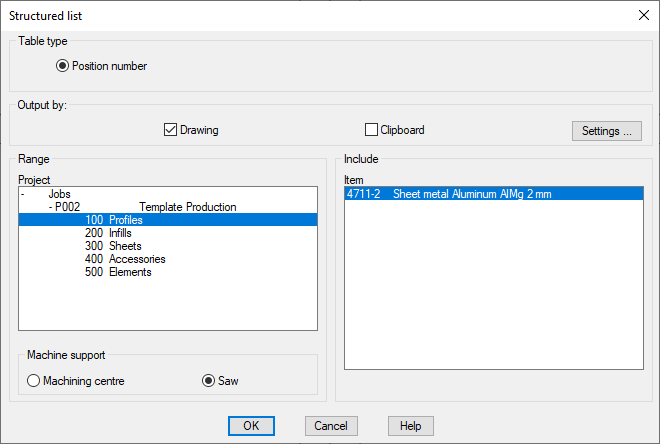
When you execute the command, the following appears:
Dialog box Structured list
db_ath_build_list
Dialog box section Table type
Position number
Creates a parts list of the individual positions. The same parts are not brought together.
A structured list can only be output according to position number.
Dialog box section Output to
Drawing
Generates a list which is inserted into the drawing. Alternatively, an existing list can be updated. An input request follows for inserting the list.
Clipboard
Copies the list to the clipboard. As standard, this tick box is deactivated.
Settings ...
Opens the Dialog box Settings table, where you can configure the list settings. You will find further information on this in the section Table.
Dialog box section Region
Project
Shows the project structure of the drawing. Here, select the job which you want to analyze.
Dialog box section Machine support
Machining center
Uses the machine support, which was set for the CNC machining center (CMC), for calculating the cutting angle.
Saw
Uses the machine support, which was set for the saw, for calculating the cutting angle.
Dialog box section Analyze
Item
Lists bars of the selected job. Here you can select which parts are to be included in the parts list. By holding down Shift or Control (Windows standard) a multiple selection is possible.
End of program
After termination of the dialog box with OK, then, depending on the setting, the structured list is inserted into the drawing and/or copied to the clipboard. After copying to the clipboard, a message appears which you must confirm. With insertion into the drawing, the following appears:
Input request
Specify insertion point or [Replace/?]: Insert the list into the drawing at the desired point or choose the Replace option to update an existing list.
With the option ? you call the help.
Note: This function produces parts lists of bars. CAD-PLAN GmbH can in no way be held liable for the results of this function and any errors and losses arising from it.