ATH Drawing > Welded seam ATHENA Drawing > Welded seam
Command input:
ath_weld
With this function you create the weld seams which can be modified similar to polylines with grips or by stretching.
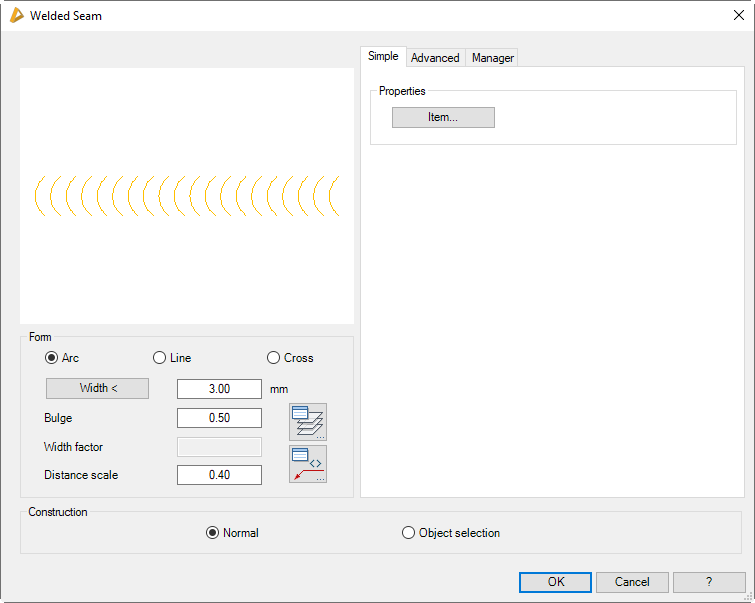
Dialog box Welded Seam
The dialog box contains the tabs Single, Expanded and Manager. The basic and advanced properties are object specific; the manager is the same for all objects. You will find a detailed description of the functions of the manager in the Chapter Management of objects.
db_ath_weld
Tab Simple
db_ath_weld_einfach
Dialog box section Properties
Item
Opens the Dialog box Item, where you can select an item number. You will find a detailed explanation on items in the Chapter Item.
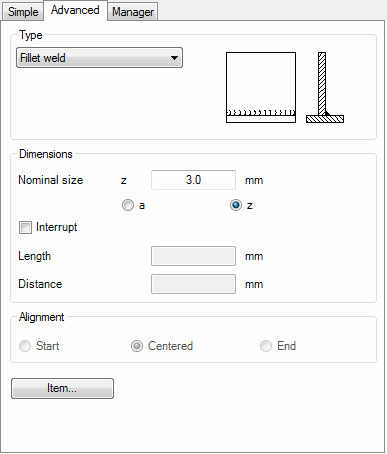
Tab Advanced
db_ath_weld_erweitert
Dialog box section Type
Defines the type of seam. Choose a seam type from the list.
Dialog box section Measurements
Nominal size
Defines the nominal size of the welded seam.
a
Defines the nominal size of the seam thickness.
z
Defines the nominal size of the limb length.
Interrupt
Creates a non-continuous welded seam.
Length
Defines the length of the welding bead.
Distance
Defines the distance between the individual welding beads.
Dialog box section Alignment
Start
Aligns the welded seam at the starting point.
Centered
Aligns the welded seam centered between the start and end points.
End
Aligns the welded seam at the end point.
Dialog box section Display
Arc
Creates a welded seam with arcs.
Line
Creates a welded seam with lines.
Cross
Creates a welded seam with crosses.
Width
Defines the width of the welded seam. With the button you can access the width of the welded seam in the drawing. For this the dialog box is temporarily closed.
Bulge
Defines the bulge of the arc-shaped welded seam. The entered value is multiplied by the radius. Values from 0.01 to 1 are permissible.
Width factor
Defines the width factor of the cross-shaped welded seam.