Tab ATHENA Modeling > Group Output > Export eluCad
Menu:
Modeling > Analyze > Export eluCad
Toolbar:
ATH Analyze > Export eluCad
Command input:
ath_elu_sat_export
Exports bars of a project into the eluCad format. This export function generates one *.3decw file and one *.sat file per bar.
While the * .sat file contains the pure geometry, the *.3decw file contains production-relevant information.
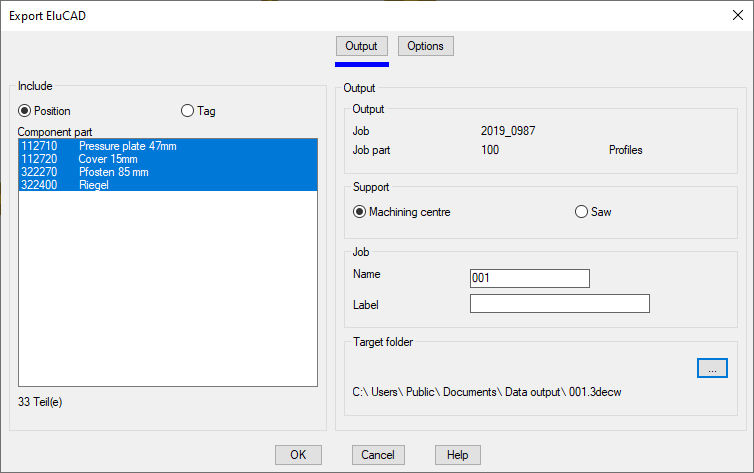
When you execute the command, the Dialog box Projects is displayed. Here, you select the job containing the bars which you want to export into the eluCad format and then close the dialog box with OK. The Dialog box Export eluCad follows:
Dialog box Export eluCad
db_ath_elu_sat_export
Dialog box section Analyze
Position
Shows the positions of the job in the component list.
Tag
Shows the labeled types in the component list.
Component list
Shows the available components or types of job. Here, select the profiles which you want to export into the eluCad format. The sum of the selected profiles is displayed below the list.
Register button Output
Dialog box section Output
Shows the data of the selected job.
Dialog box section Support
Machining center
Uses the support defined in Edit bar assembly (extended) for the machining center in order to orientate the selected profiles in the eluCad output.
Saw
Uses the support defined in Edit bar assembly (extended) for the saw in order to orientate the selected profiles in the eluCad output.
Dialog box section Job
Name
Defines the name of the *.3decw file.
Designation
Defines the designation which, in addition to the job data, is written in the information section within the *.3decw file.
Destination folder
Defines the folder in which the *.3decw file is saved. When you click the button [...], the dialog box Find folder is displayed.
Register button Options
Dialog box section Default
Supplied length
Defines the length in which the profiles are supplied. The supplied length is entered for each bar in the *.3decw file.
End of program
If you terminate the dialog box with OK, one *.3decw file and one *.sat file per bar are saved in the specified folder. Cancel closes the dialog box and the settings are discarded.
Note: All the data produced are to be checked by the user. CAD-PLAN GmbH can in no way be held liable for the results of this function and any errors and losses arising from it.