Axis
|
Ribbon:
|
Tab ATHENA > Group Drawing > Axis
|
|
Menu:
|
ATHENA > Drawing > Axis
|
|
Toolbar:
|
ATH Drawing > Axis
ATHENA Drawing > Axis
|
|
Command input:
|
ath_cline
|
With this command you can create axes with an overlap.
When you start the command, the following appears:
Input request
Option Points
Specify start point or [Object/Settings/?]:
Use the mouse or enter coordinates to specify the axis start point.
Use
Option Object to convert an object to an axis.
Use the
Option Settings to open the
Dialog box Axis and adapt the axis settings.
With the option ? you call the help.
Specify next point or [Arc point/Undo/Direction/Angle/Length/?]:
Use the mouse or enter coordinates to specify the next point of the axis.
With the
Option Arc point you can specify an arc point. Further input requests follow.
Choose the option Undo to repeat the last input request.
With the
Option Direction you can specify a direction. Further input requests follow.
With the
Option Angle you can specify an angle. Further input requests follow.
With the
Option Length you can specify a length. Further input requests follow.
Option Object
Select object or [Points/Settings/?]:
Select the object which you want to convert into an axis.
With the
Option Points you can create an axis by specifying points.
Option Arc point
Specify arc point or [Line/Undo/?]:
Use the mouse or enter coordinates to specify an arc point.
Specify endpoint of the arc or [Undo/Line/Arc point/?]:
Use the mouse or enter coordinates to specify the end point of the arc.
Option Direction
Specify direction or [Length/Angle/Point/Undo/?]:
Use the mouse or enter coordinates to specify the direction of the axis.
Option Angle
Specify angle or [Length/Direction/Point/Undo/?]:
Use the mouse or enter coordinates to specify the axis angle.
Option Length
Specify length or [Direction/Angle/Point/Undo/?]:
Specify the length of the axis.
Option Settings
Opens the dialog box Axis, where you can adapt further properties.
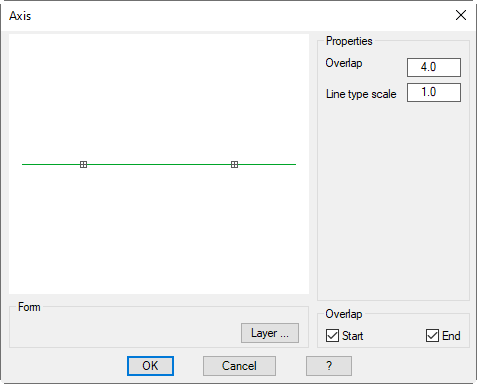
Dialog box Axis
db_ath_cline
Dialog box section Properties
Overlap
Defines the length of the overlap of the axis.
Line type scale
Defines the line type scale of the axis.
Dialog box section Display
Layer
Opens the
Dialog box Layer assignment. The default layer for the axis line may be overridden here. You will find further information in the section
Layer assignment.
Dialog box section Overlap
Start
Creates an axis with overlap on the start side.
End
Creates an axis with overlap on the end side.
Note
• To carry out changes to the axes, you can double click them.