Edit free semi-finished product
Properties of free semi-finished products in the drawing can be changed with a double click.
With unnamed free semi-finished products the
Dialog box Free semi-finished product is displayed and you can modify their properties. Outline changes are also possible here.
With named semi-finished products only display properties can be changed. To do this, the
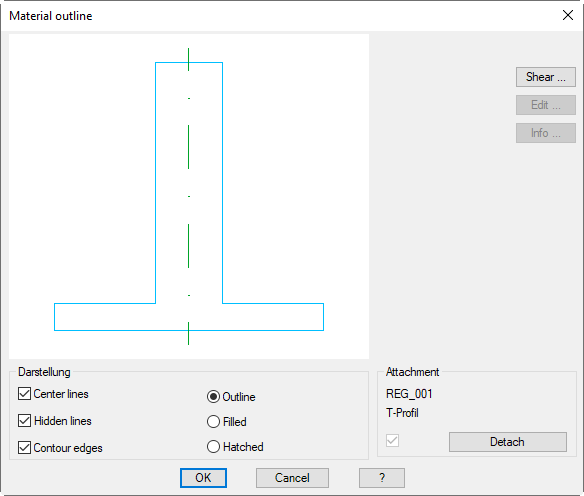
Dialog box Edit free semi-finished product is shown.
Dialog box Edit free semi-finished product
db_ath_region_edit
At the top left you can see the preview of the free semi-finished product.
Shear
Opens the
Dialog box Shear . You will find further information in the Chapter
Shear object .
Dialog box section Display
Center lines
Switches center lines on or off.
Hidden lines
Switches the hidden lines on or off.
Contour edges
Switches the contour edges for semi-finished products on or off. This option is only available for semi-finished products with roundings.
Outline
Creates a semi-finished product without infill.
Filled
Creates a filled semi-finished product.
Hatched
Creates a semi-finished product with hatched infill. When you select a material, the material-dependent hatching is used.
Dialog box section Assignment
Here, the saved name of the free semi-finished product is shown.
Detach
Releases the link to the saved object .
Associated commands
This site works best with JavaScript enabled