Tab ATHENA Modeling > Group Output > Project glass overview
Menu:
Modeling > Analyze > Project glass overview
Toolbar:
ATH Analyze > Project glass overview
Command input:
ath_panel_overview
Creates an overview of the glasses of a project.
The overview is output in a drawing with layouts. Attributes of the drawing are automatically filled in with project information and glass information.
A tile view displays several panels incl. dimensions per sheet, with different types of glass generally appearing in different layouts.
You can customize the templates used to your company standard or expand them.
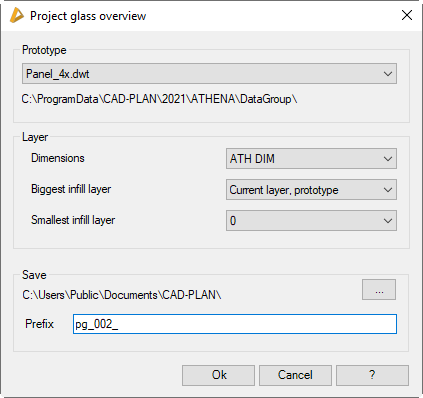
When you call the command, you must select a job in the Dialog box Projects. Optionally, you can select individual infills by object selection. Job selection is omitted when you call the command from the Project browser. Then the following dialog box will appear:
Dialog box Project glass overview
db_ath_panel_overview
Dialog box section Prototype
Here, you select the template for the glass overview. By default, there are templates for one, four or nine glasses per drawing.
The path for the template drawings is shown below selection menu.
Dialog box section Layer
Dimensions
Specifies the layer used for the glass dimensions.
Biggest infill layer
Defines the layer of the largest layer of glass.
Smallest infill layer
Defines the layer of the smallest layer of glass. This setting is only effective for stepped-edge glazing.
Save
[...]
Specifies the storage location of the overview drawing. For this, the standard Windows dialog box Browse for Folder is opened, where you can define the desired destination folder.
Prefix
Defines the prefix of the file name of the outline drawing. The final file name consists of the prefix and the job name. If you create multiple outline drawings consecutively, backups of previous files are created with an incremented number.
End of program
Click OK to close the dialog box and to create the layout drawing of the infills.
Cancel closes the dialog box and the settings are discarded.