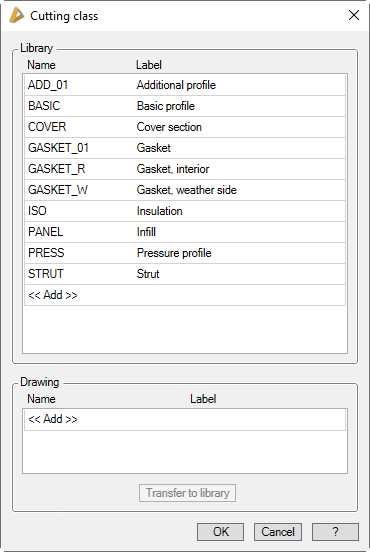
Assigns a cutting class to the current component. Components which meet at a junction and are to be cut together must have identical cutting classes. These components are processed during the Cutting according to the type of joint.
The dialog box is always opened when you want to assign a cutting class to a component.
Dialog box Cutting class
db_ath_cut_admin
Dialog box section Library
In this section, the cutting classes of your work environment are displayed.
Name
Defines the name of the cutting class. The name is equivalent to a unique, language-neutral identifier.
By clicking twice slowly, you can edit the name directly in the line.
Designation
Defines the cutting class designation in the the current national language.
By clicking twice slowly, you can edit the label directly in the line.
[...]
Opens the Dialog box Designation, where you can conveniently enter the label in several languages.
<<Add>>
Creates a new cutting class.
Dialog box section Drawing
In this section, the cutting classes of the drawing are displayed, unless they are identical to those of your working environment.
This may be the case, for example, if you have opened a third-party drawing.
Editing the cutting classes is identical to those in the library area.
Transfer to library
Transfers the cutting class to the library area.
End of program
OK
Closes the dialog box and applies the changes made.
Cancel
Closes the dialog box and discards the changes made.