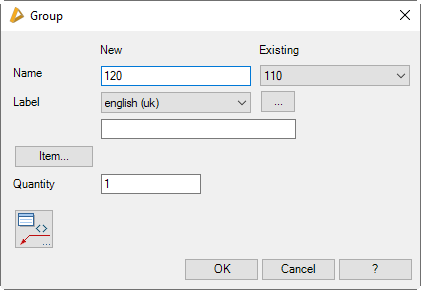
Defines the name of the group. The name should be short, concise and unique. No names may be assigned more than once per order. For detailed information, use the label.
Existing
The pull-down menu shows the existing groups for information purposes. For example, you can find out the next free number in the number range of the groups here.
Designation
Here you can specify a language-dependent label for the group. You select a language from the list and add the appropriate text in the line below. You proceed like this for each language.
[...]
Opens the Dialog box Designation, where you can conveniently enter the label in several languages.
Item
Opens the Dialog box Item, where you can select an item number. You will find a detailed explanation on items in the Chapter Item.
Quantity
Defines the required number of groups.
Opens the Dialog box Label. You will find further information on this in the Chapter Label.
End of program
OK
Saves the current setting and terminates the dialog box.