Change positions
|
Ribbon:
|
Tab ATHENA Modeling > Group Project > Change positions
|
|
Menu:
|
Modeling > Analyze > Change positions
|
|
Toolbar:
|
ATH Analyze > Change positions
|
|
Command input:
|
ath_build_cpos_change
|
Changes the numbers of selected positions of a job.
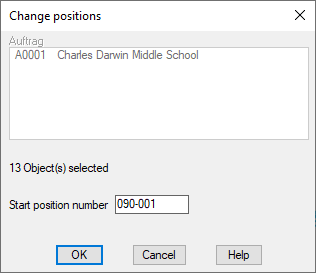
Dialog box Change positions
db_ath_build_cpos_change
The job list shows the jobs of the drawing. If there are several jobs, you must select the one whose positions are to receive new numbers.
The number of objects of the selected job is displayed for information below the list.
Start position number
Here you define the new start number of the positions. The numbers are changed after closing the dialog box with OK by object selection.
End of program
Select Cancel to close the dialog box without changing position numbers.
Select OK if you want to change position numbers. The following procedure is used:
Input request
Select objects
Select the positions whose numbers are to be changed according to the specification.
The input request is repeated until you terminate the object selection by pressing the Enter key.
Associated commands: