Change of Z coordinates to 0
|
Ribbon:
|
Tab ATHENA > Group Modify > Change of Z coordinates to 0
|
|
Menu:
|
ATHENA > Modify > Change of Z coordinates to 0
|
|
Toolbar:
|
ATH Modify
|
|
Command input:
|
ath_aux_planar
|
Changes the values of the Z coordinates of objects to the value 0 in relation to the world coordinate system (WCS).
With this function you can correct objects that were wrongly drawn in an incorrect plane.
|
This command does not create projections of 3D objects!
|
The following AutoCAD objects are handled:
• Lines, polylines, multilines and points
• Circles and arcs
• Ellipses and splines
• Dimensions and leader lines
• Texts, MTexts and attribute definitions
• Hatching
• Solids
• 3D surfaces
• Blocks and attributes
• Above objects that are contained in blocks
Input request
Select objects:
Select the objects whose Z coordinate values are to be changed to 0.
This input request is repeated. Press the Enter key to terminate the object selection.
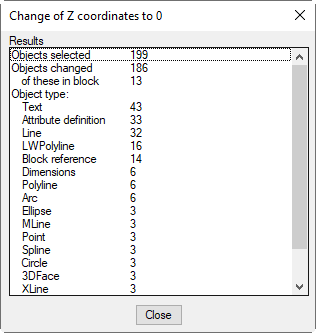
Dialog box Change of Z coordinates to 0
db_ath_aux_planar.png
A dialog box follows which lists the treated objects.
End of program
Press the Close button.