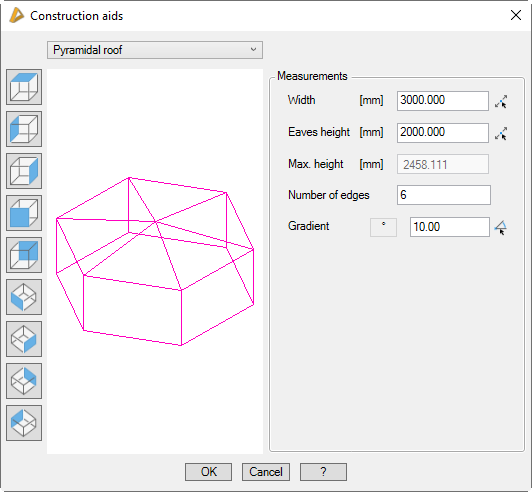
Tab ATHENA Modeling > Group Axis model > Construction aids
Menu:
Modeling > Apply > Construction aids
Toolbar:
ATH Apply > Construction aids
Command input:
ath_aux_constr
Routine for quickly inserting a three-dimensional auxiliary construction. You determine the type and dimensions of the auxiliary construction in a dialog box. The construction is inserted into the drawing on the auxiliary line layer. You can then use the Apply bar assembly command to assign profile outlines (profile groups) to the axes, for example.
Dialog box Construction aids
db_ath_aux_constr
In this dialog box you choose your construction type in the drop-down menu at the top left. After selection, the construction is displayed in a preview.
The following constructions are available:
• Lean-to roof
• Gabled roof
• Hipped roof
• Compass roof
• Pyramidal roof
• Domed roof
• Facade
• Saw-toothed roof
• Dormer lean-to roof
• Dormer gabled roof
• Dormer hipped roof
• Dormer compass roof
To the left of the preview are buttons for changing the view in the preview. Changing the view only affects the preview and has no effect on the insertion of the construction. You will find further information on this in the section Object views.
Once you have selected a construction, enter the dimensions into the corresponding entry fields in the right half of the dialog box.
Dialog box section Measurements
The dimensions for the individual types of construction differ. Therefore, not all of the input fields are required. Input fields that are not required are masked out.
With the button next to the respective input field, you can access the dimension or the angle from the drawing. For this, the dialog box is temporarily closed and an input request follows.
Length
Defines the construction length.
Width
Defines the construction width.
Eaves height
Defines the eaves height of the construction.
Max. height
You cannot specify the maximum height of the construction. This is displayed as info.
Number of edges
Defines the number of edges for pyramids and domed roofs.
Gradient, gradient 1, gradient 2
Defines the gradient or gradients of the construction.
Roof gradient
Defines the roof gradient in dormers.
All gradients can be specified as angles in ° or as slopes in %. Click the button [%] or [°] to switch.
Division
Defines the division for different roof shapes.
Baseline
Defines the course of a facade. Click the button to define the baseline of the facade. You only obtain a preview of the facade when you have defined a baseline.
End of program
If you quit the dialog box with Cancel, the settings are reset. If you quit the dialog box with OK, the following appears:
Input request
All types of construction except Facade
Specify insertion point:
Use the mouse or enter co-ordinates to specify an insertion point for the construction.
Specify rotation angle <0>:
Enter a rotation angle for the construction or confirm the default angle by entering Enter or a right click.
Facade type of construction
The facade is directly inserted, because the baseline is known.