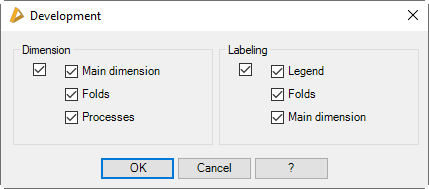
Dimension and label settings of the development
Here you define whether and in which form the sheet development is dimensioned and labeled.
|
The settings are not saved globally, but rather for each sheet separately.
|
Dialog box Development
db_ath_easy_sheet_bem_settings
Dialog box section Dimensions
The main tick box turns all dimension options on or off with one mouse click.
Maximum dimension
Dimensions the enclosing rectangle of the sheet development
Folds
Dimensions the distances of the bending lines to the edge and to one another.
Processes
Dimensions the distances of the processes to the edge and to one another.
| Processes on the primary surface are not dimensioned to the edge. |
Dialog box section Label
The main tick box turns all label options on or off with one mouse click.
Legend
Inserts the legend to the left below the sheet. Here there is information about the sheet material, the fold table used and the bending lines.
Folds
Labels the angle of the fold at the bending lines.
| The fold angles are labeled with small text size to ensure clear presentation. |
Maximum dimension
Inserts the dimensions of the enclosing rectangle and the weight and area of the developed sheet in the center of gravity of the development.